WhatsApp Business Automation Tool: Automate Sales & Support in 2026
Manual WhatsApp replies don't scale. When your business handles 50, 500, or 5,000 conversations a day, replying one-by-one isn't just inefficient — it's a revenue killer. Leads go cold in minutes, support tickets pile up overnight, and your team burns out answering the same questions over and over again.
A WhatsApp business automation tool fixes this by letting you build workflows that trigger automatically: welcome messages fire the instant a customer says hello, abandoned cart nudges go out without anyone pressing send, and FAQ replies resolve tickets while your team sleeps. The result? Faster response times, higher conversions, and a team that focuses on high-value conversations instead of repetitive tasks.
In this guide, you'll learn how WhatsApp automation works, which workflows deliver the highest ROI, how to build them step-by-step, and why over 23,500 businesses trust ChatDaddy — an official Meta ISV Partner — to automate more than 10 million messages per day.
Table of Contents
- What Is a WhatsApp Business Automation Tool?
- Why Every Business Needs WhatsApp Automation in 2026
- 7 High-ROI Automation Workflows You Can Build Today
- Understanding Triggers, Conditions, and Actions
- How to Set Up WhatsApp Automation in 15 Minutes
- Comparing WhatsApp Automation Platforms
- Auto-Replies: Templates, Best Practices, and Examples
- Advanced Automation: AI Chatbots and Smart Routing
- 5 Automation Mistakes That Get Your Number Banned
- FAQ
What Is a WhatsApp Business Automation Tool?
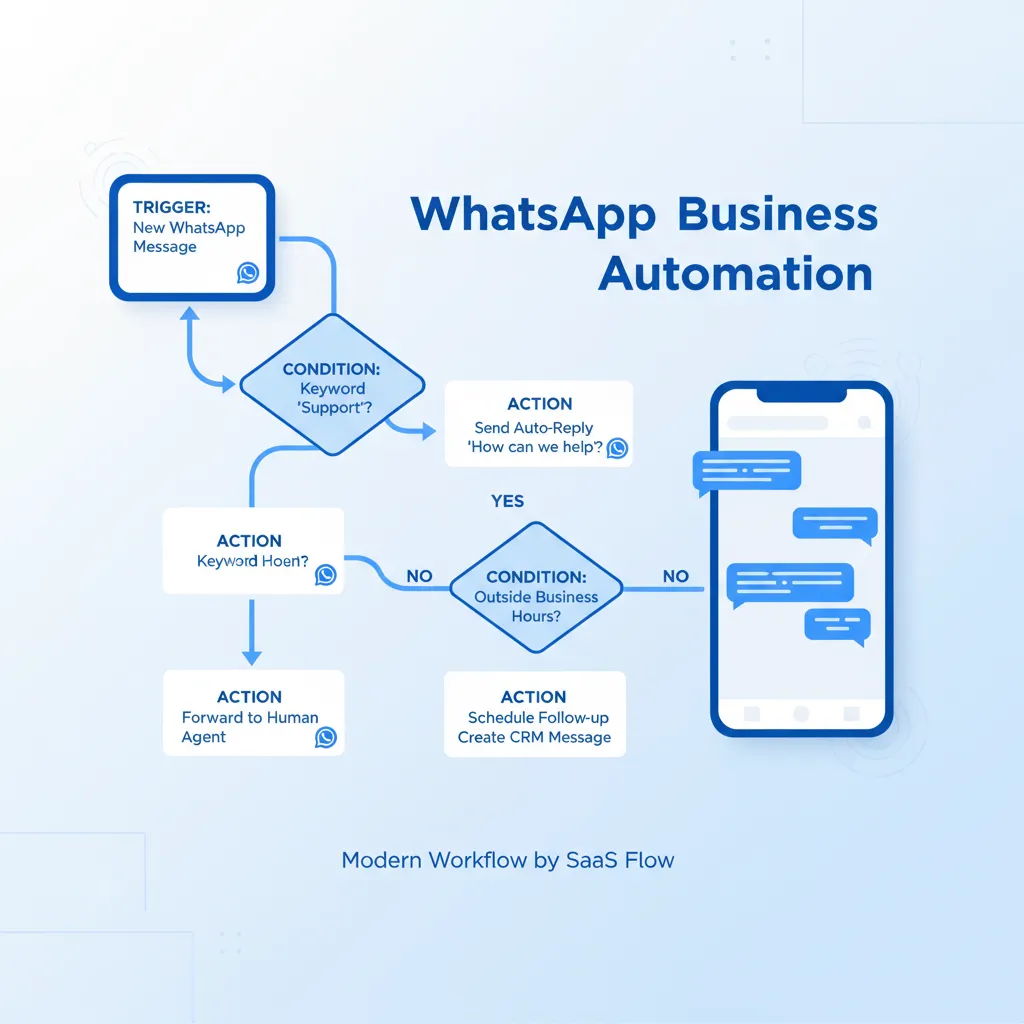
Think of it as the autopilot for your WhatsApp conversations. Instead of a human manually typing responses to every incoming message, an automation tool uses triggers (a customer sends a message), conditions (is this a new lead or existing customer?), and actions (send a welcome message, assign to an agent, add a tag) to handle conversations automatically.
The foundation of all WhatsApp automation is the WhatsApp Business API. Unlike the free WhatsApp Business App — which is limited to a single device, basic quick replies, and no real automation — the API opens up programmable messaging at scale. You can send template messages, build interactive menus, route conversations to the right team member, and track every interaction with analytics.
Modern tools like ChatDaddy wrap the API in a no-code interface so that anyone on your team — not just developers — can build sophisticated automation workflows in minutes. You drag, drop, connect, and deploy. No coding. No API calls. No waiting for engineering sprints.
Automation vs. Chatbots: What's the Difference?
A chatbot is one type of automation. It's a conversational flow that responds to customer messages in real-time. But WhatsApp automation is broader than that. It includes:
- Triggered messages — fire automatically based on events (new contact, abandoned cart, appointment reminder)
- Workflow automations — assign conversations, add tags, update CRM fields, notify team members
- Broadcast campaigns — scheduled or event-triggered bulk messages to segmented audiences
- Chatbot flows — interactive conversation trees that qualify leads, answer FAQs, or collect information
- Auto-replies — instant responses to incoming messages based on keywords or time of day
Why Every Business Needs WhatsApp Automation in 2026

The numbers tell the story:
- 98% open rates on WhatsApp messages versus 20% on email — your automations actually get seen (DemandSage, 2025)
- 82% of consumers expect a response within 10 minutes when contacting a business via messaging (HubSpot, 2025)
- 45-60% click-through rates on WhatsApp promotional messages versus 2-5% for email campaigns (yCloud, 2025)
- Up to 60% reduction in support costs when chatbots handle tier-1 queries automatically (Gartner, 2025)
- 30-45% increase in conversion rates for businesses using automated lead qualification on WhatsApp (Chatarmin, 2025)
In 2026, Meta made service replies within 24 hours completely free. That means every automated response your chatbot sends to an incoming customer query costs you nothing. Only outbound marketing templates carry a per-message charge. This makes automation not just efficient but economically essential — the more you automate your inbound responses, the more you save.
What Happens Without Automation
Without automation, your WhatsApp looks like this: leads message at 11 PM and get a reply at 9 AM — by then they've bought from a competitor. Your team answers "What are your business hours?" forty times a day. High-value conversations get buried under routine questions. And you have no data on which messages convert and which don't.
A single automation — a welcome message that fires in under 3 seconds — can increase your lead capture rate by 40%. That alone justifies the setup time.
7 High-ROI Automation Workflows You Can Build Today
1. Welcome Message Sequence
Trigger: New contact messages your number for the first time.
Action: Instantly send a branded welcome message with quick-reply buttons (e.g., "Browse Products," "Talk to Sales," "Get Support").
Result: Sets expectations, routes the conversation, and captures the lead — all in under 3 seconds.
With ChatDaddy's chatbot builder, you can create multi-step welcome sequences that greet the customer, ask qualifying questions, and route them to the right department — all without a human touching the conversation.
2. Abandoned Cart Recovery
Trigger: Customer adds items to cart but doesn't complete checkout (via Shopify/WooCommerce integration).
Action: After 1 hour, send a WhatsApp message with cart contents, product image, and a direct checkout link.
Result: Recovery rates of 25-35% versus 5-10% for email recovery campaigns.
3. Appointment Reminders
Trigger: 24 hours before a scheduled appointment.
Action: Send a reminder with date, time, location, and a "Reschedule" button.
Result: Reduces no-shows by up to 40%. Clinics, salons, and consultancies use this daily.
4. Lead Qualification Chatbot
Trigger: Customer clicks a Click-to-WhatsApp ad on Facebook or Instagram.
Action: Chatbot asks 3-5 qualifying questions (budget, timeline, needs), tags the lead, and routes hot prospects to a sales agent instantly.
Result: Sales team only talks to qualified leads. Conversion rates jump 30-45%.
5. Order Status Updates
Trigger: Order status changes in your e-commerce platform.
Action: Automatically send "Order confirmed," "Shipped," and "Delivered" messages with tracking links.
Result: Reduces "Where is my order?" support tickets by up to 70%.
6. Post-Purchase Follow-Up
Trigger: 3 days after delivery.
Action: Send a satisfaction survey, request a review, or offer a complementary product recommendation.
Result: Drives repeat purchases and builds a review pipeline automatically.
7. Re-Engagement Campaign
Trigger: Contact hasn't interacted in 30+ days.
Action: Send a targeted broadcast with a special offer or "We miss you" message.
Result: Reactivates 15-25% of dormant contacts who would otherwise churn permanently.

Understanding Triggers, Conditions, and Actions
Every WhatsApp automation workflow consists of three building blocks:
Triggers (What Starts the Workflow)
- Message received — any incoming message or specific keyword
- Contact created — new contact added to your database
- Tag added/removed — contact's status changes
- External event — webhook from Shopify, Zapier, or custom API
- Time-based — scheduled broadcasts or follow-up delays
Conditions (Who Qualifies)
- Contact attributes — country, language, customer tier
- Conversation state — open, closed, assigned, unassigned
- Tag filters — "VIP," "Lead," "Support," or custom tags
- Time windows — business hours vs. after-hours
- Message content — keyword matching or intent detection
Actions (What Happens)
- Send message — text, image, document, or interactive template
- Assign conversation — route to specific agent or team
- Add/remove tag — update contact segmentation
- Update custom field — store data like lead score or preference
- Send webhook — notify external systems (CRM, ERP, spreadsheet)
- Delay — wait X hours/days before executing next action
In ChatDaddy, you build these visually with a drag-and-drop interface. No code, no formulas, no JSON. Connect the blocks, test the flow, and deploy — typically in under 15 minutes.
How to Set Up WhatsApp Automation in 15 Minutes
Here's the step-by-step process:
- Sign up at chatdaddy.tech — free plan available with automation features included
- Connect your WhatsApp number — ChatDaddy walks you through Meta Business verification as an official Meta ISV Partner
- Open the Automation Builder — navigate to the chatbot or workflow section in your dashboard
- Select a template or start from scratch — ChatDaddy provides pre-built templates for welcome messages, lead qualification, FAQ handling, and more
- Configure your trigger — choose what starts the automation (new message, keyword, event)
- Add conditions and actions — drag-and-drop the logic blocks you need
- Test with a sample message — send yourself a test message to verify the flow works correctly
- Activate — flip the switch and your automation is live
Most businesses build their first complete automation in 10-15 minutes. By the end of the first hour, they typically have 3-4 workflows running — welcome message, FAQ bot, after-hours auto-reply, and a lead qualification flow.
Automate Your WhatsApp in 15 Minutes
Join 23,500+ businesses using ChatDaddy to automate sales, support, and marketing on WhatsApp. No coding required.
Start Free TodayComparing WhatsApp Automation Platforms
| Feature | ChatDaddy | WATI | Respond.io | Twilio |
|---|---|---|---|---|
| Free Plan | Yes | No | No | Pay-per-use |
| Starting Price | $119/mo | $49/mo | $99/mo | Variable |
| No-Code Chatbot | Yes, AI-powered | Flow builder | Workflows | No (API only) |
| Workflow Automation | Unlimited | Limited by plan | Advanced | Custom dev |
| Auto-Replies | Keyword + AI | Keyword | Keyword | Custom dev |
| Broadcast | Unlimited | Limited | Limited | Via API |
| Integrations | Shopify, Zapier, HubSpot, Sheets | Shopify, Zapier | Zapier, CRMs | Any (via API) |
| Meta ISV Partner | Yes | Yes | Yes | Yes |
| Coexistence | Yes — use API + WhatsApp Business App on same number (free) | No | No | No |
| Best For | SMBs wanting no-code automation | Indian market | Enterprise teams | Developer teams |
For businesses that want powerful automation without a developer on staff, ChatDaddy is the strongest choice. It's the only platform offering a free plan with workflow automations, a no-code chatbot builder, and broadcast messaging (AI-powered chatbot available on Pro and Max plans). Competitors either require coding (Twilio) or charge $49-99/month to access basic automation features.
Auto-Replies: Templates, Best Practices, and Examples
Auto-replies are the simplest form of WhatsApp automation — and often the most impactful. Here are proven templates you can use today:
Welcome Message Template
Hi {{name}}! Welcome to [Your Business]. How can we help you today?
1. Browse products
2. Track my order
3. Talk to support
Just reply with a number to get started.
After-Hours Auto-Reply
Thanks for reaching out! Our team is currently offline. We'll get back to you first thing tomorrow (9 AM - 6 PM, Mon-Fri).
In the meantime, check our FAQ: [link]
Order Confirmation
Your order #{{order_id}} is confirmed! We're preparing it now.
Estimated delivery: {{delivery_date}}
Track your order: {{tracking_link}}
Questions? Just reply to this message.
Best Practices for Auto-Replies
- Speed matters — configure auto-replies to fire within 3 seconds of an incoming message
- Personalize — use the customer's name and relevant details (order number, product name)
- Set expectations — if a human will follow up, say when ("within 2 hours")
- Include a CTA — every auto-reply should tell the customer what to do next
- Keep it short — aim for under 160 characters for the core message
- Test on mobile — preview how your message looks on an actual phone screen
Advanced Automation: AI Chatbots and Smart Routing
Once you've nailed basic auto-replies, it's time to level up with advanced automation capabilities that ChatDaddy offers:
AI-Powered Chatbots
Traditional chatbots match keywords. AI chatbots understand intent. A customer typing "I want to return my shoes" and "How do I send back my order?" both route to the same return flow — even though they share zero keywords. ChatDaddy's AI chatbot uses natural language processing to understand what customers actually mean, not just what they type.
This matters because customers don't speak in keywords. They speak in natural language, with typos, slang, and abbreviations. An AI chatbot handles all of that gracefully, reducing the percentage of conversations that need human intervention from 60% to under 20%.
Smart Conversation Routing
Not every conversation should go to the same person. Smart routing assigns conversations based on:
- Agent skills — technical questions go to tech support, billing questions go to finance
- Language — Arabic speakers route to Arabic-speaking agents
- Workload — new conversations go to the agent with the fewest open chats
- Customer tier — VIP customers get priority routing to senior agents
- Time zone — route to agents in the customer's region during their business hours
With ChatDaddy's shared inbox, you configure these rules once and every conversation automatically lands with the right person.
Multi-System Workflows
The most powerful automations connect WhatsApp to your entire tech stack. Examples:
- Shopify + WhatsApp — new order triggers a confirmation message, shipping update triggers a tracking message, delivery triggers a review request
- HubSpot + WhatsApp — new CRM deal stage triggers a WhatsApp follow-up; reply data syncs back to the CRM
- Google Sheets + WhatsApp — chatbot collects lead information and writes it directly to a spreadsheet for your sales team

5 Automation Mistakes That Get Your Number Banned
Mistake 1: No Opt-In Before Broadcasting
WhatsApp requires explicit opt-in before you send marketing messages. A simple "Reply YES to receive updates" works. Without it, recipients report your messages as spam, your quality rating drops, and Meta restricts or bans your number. Always collect opt-in through your broadcast tool before sending campaigns.
Mistake 2: Blasting the Same Message to Everyone
Sending an identical promotional message to your entire contact list tanks your quality rating. Segment your audience by interest, purchase history, or engagement level. Use ChatDaddy's contact tags and custom fields to create targeted segments that receive relevant messages.
Mistake 3: Using Unapproved Templates
Every outbound message sent outside the 24-hour service window must use a Meta-approved template. Sending free-text marketing messages outside this window violates WhatsApp's policies. ChatDaddy's template manager handles the approval process and prevents you from accidentally sending non-compliant messages.
Mistake 4: Over-Automating Without a Human Fallback
Chatbots should handle routine queries, not every conversation. When a customer asks something complex or expresses frustration, the bot should hand off to a human agent immediately. Build "transfer to agent" escape routes into every automation flow.
Mistake 5: No Opt-Out Mechanism
Every broadcast message must include a way for recipients to unsubscribe. "Reply STOP to unsubscribe" at the bottom of your template keeps you compliant and maintains a healthy contact list. ChatDaddy automatically handles opt-out processing when recipients reply with stop words.
Related Articles
- AI Chatbot for WhatsApp: Build Smart Bots That Sell in 2026
- WhatsApp Automation: The Complete Guide for 2026
- WhatsApp Chatbot: The Complete Guide to Building AI-Powered Bots in 2026
- WhatsApp Chatbot Builder No Code: Create Powerful Bots in Minutes (2026 Guide)
- WhatsApp Chatbot Dubai: Automate Customer Service for UAE Businesses in 2026
Frequently Asked Questions
What is a WhatsApp business automation tool?
A WhatsApp business automation tool is a platform that connects to the WhatsApp Business API and lets you create automated workflows — including auto-replies, chatbots, triggered messages, and broadcast campaigns — so your business can handle conversations at scale without manual intervention for every message.
Can I automate WhatsApp messages for free?
Yes. ChatDaddy offers a free plan that includes basic automation features like auto-replies, a chatbot builder, and workflow automation. The WhatsApp Business API charges per conversation, but ChatDaddy's free tier covers small volumes. Paid plans start at $119/month for advanced automation.
Is WhatsApp automation legal?
Yes, WhatsApp automation is fully legal when done through the official WhatsApp Business API via a Meta-certified partner like ChatDaddy. You must collect opt-in consent before sending marketing messages, use approved message templates for outbound communications, and provide opt-out mechanisms in broadcasts.
What's the difference between WhatsApp Business App automation and API automation?
The WhatsApp Business App offers basic features like away messages and quick replies, but it's limited to one device and cannot run complex workflows. API automation through platforms like ChatDaddy enables multi-agent access, AI chatbots, triggered workflows, broadcast messaging, CRM integrations, and analytics — all at scale.
How much does WhatsApp automation cost?
Costs vary by platform. ChatDaddy starts free with paid plans at $119/month (Basic), $299/month (Pro), and $799/month (Max). Competitors like WATI start at $49/month and Respond.io at $99/month. Additionally, Meta charges per-conversation fees for WhatsApp API usage, though service conversations within 24 hours are free in 2026.
Can I connect WhatsApp automation to Shopify?
Yes. ChatDaddy integrates directly with Shopify to automate order confirmations, shipping updates, abandoned cart recovery messages, and post-purchase follow-ups. The integration takes under 10 minutes to set up and runs automatically once configured.
Will my WhatsApp number get banned for using automation?
Not if you use the official Business API through a Meta-certified partner like ChatDaddy. Bans typically happen when businesses use unofficial tools, send messages without opt-in, or violate Meta's messaging policies. ChatDaddy's compliance features prevent you from accidentally breaking the rules.
How do I build a WhatsApp chatbot without coding?
Use ChatDaddy's no-code chatbot builder. You drag and drop conversation blocks — messages, questions, conditions, and actions — to create interactive flows. Pre-built templates for lead qualification, FAQ handling, and appointment booking let you launch a working chatbot in under 15 minutes without writing a single line of code.