ChatDaddy vs HubSpot: Which WhatsApp Platform Is Better in 2026?
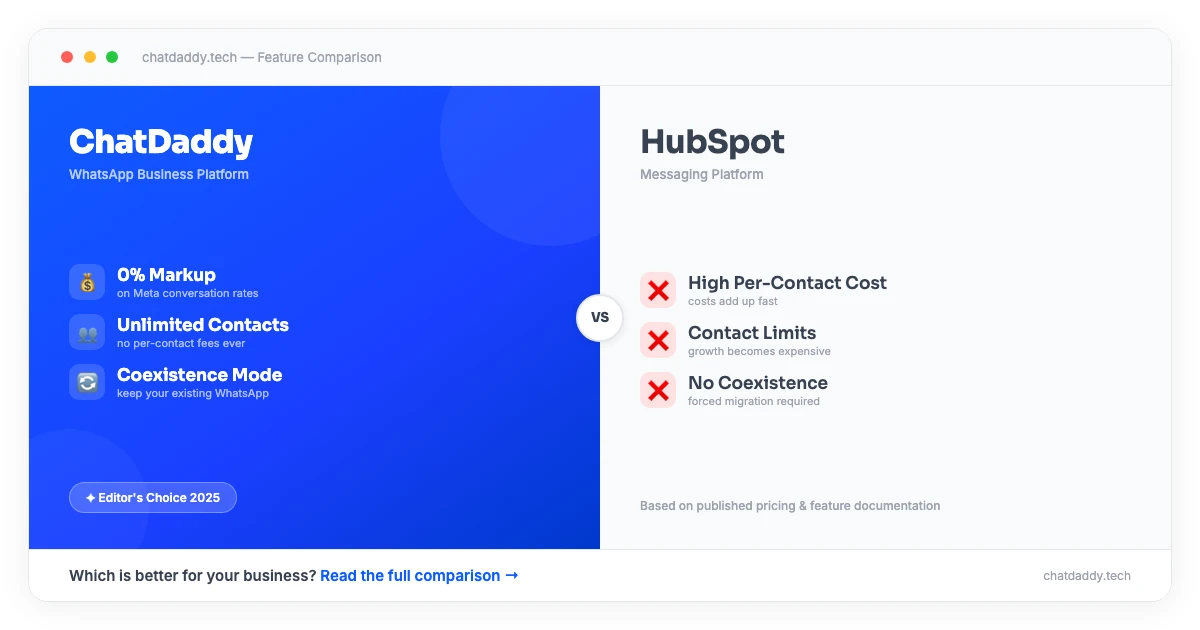
Table of Contents
1. Platform Overview
ChatDaddy is a Meta-certified ISV Partner serving over 23,500 businesses that process more than 10 million messages daily. It offers a comprehensive WhatsApp business suite: shared team inbox, GPT-powered chatbot, broadcast engine, full CRM pipeline, and visual automation builder. Plans start with a free trial, paid from $119/month, with 0% message markup and unlimited contacts on all plans. ChatDaddy also supports coexistence mode — running both the WhatsApp API and WhatsApp Business App on the same number simultaneously.
HubSpot is a CRM and marketing platform originating from USA. HubSpot is a leading all-in-one CRM and marketing platform. WhatsApp integration in HubSpot is available through third-party apps or HubSpot's native WhatsApp feature (released in 2023), which is primarily focused on using WhatsApp as a support and sales channel within the HubSpot CRM. WhatsApp broadcasting and automation in HubSpot requires higher-tier plans and is not as deep as purpose-built WhatsApp platforms.
This comparison examines both platforms across features, pricing, use cases, and migration, so you can make an informed decision for your business.
2. Feature-by-Feature Comparison
| Feature | ChatDaddy | HubSpot |
|---|---|---|
| Shared Inbox | Multi-agent inbox with routing, collision detection, and SLA tracking | Conversations inbox in Service Hub; WhatsApp is one channel |
| AI Chatbot | GPT-powered WhatsApp chatbot with lead qualification and auto-tagging | HubSpot chatbot builder; limited WhatsApp-specific bot capabilities |
| Broadcast | Unlimited segmented WhatsApp broadcasts with scheduling and analytics | WhatsApp marketing messages via Marketing Hub; requires high-tier plan |
| CRM | Full pipeline CRM with deal stages, contact scoring, and revenue tracking | Industry-leading CRM — this is HubSpot's core strength |
| Automation | Visual WhatsApp workflow builder with conditional branching | Powerful marketing automation; WhatsApp actions limited |
| WhatsApp API | Direct Meta ISV Partner, 0% message markup | WhatsApp via BSP integration; markup may apply |
| Pricing Model | Flat per-team monthly plans from free trial | Tiered by features and contact volume; scales steeply |
| Multi-channel | WhatsApp, Instagram, Facebook Messenger | Email, WhatsApp, SMS, social, ads — full omnichannel |
| Coexistence Mode | Yes — API + WhatsApp Business App on same number | No |
| Integrations | Shopify, HubSpot, Zapier, Make, REST API | Native HubSpot integrations — market-leading ecosystem |
| Unlimited Contacts | Yes — all plans | Contact-based pricing — costs increase significantly with list size |
| WhatsApp Commerce | Built-in product catalog and in-chat payments | Not available natively |
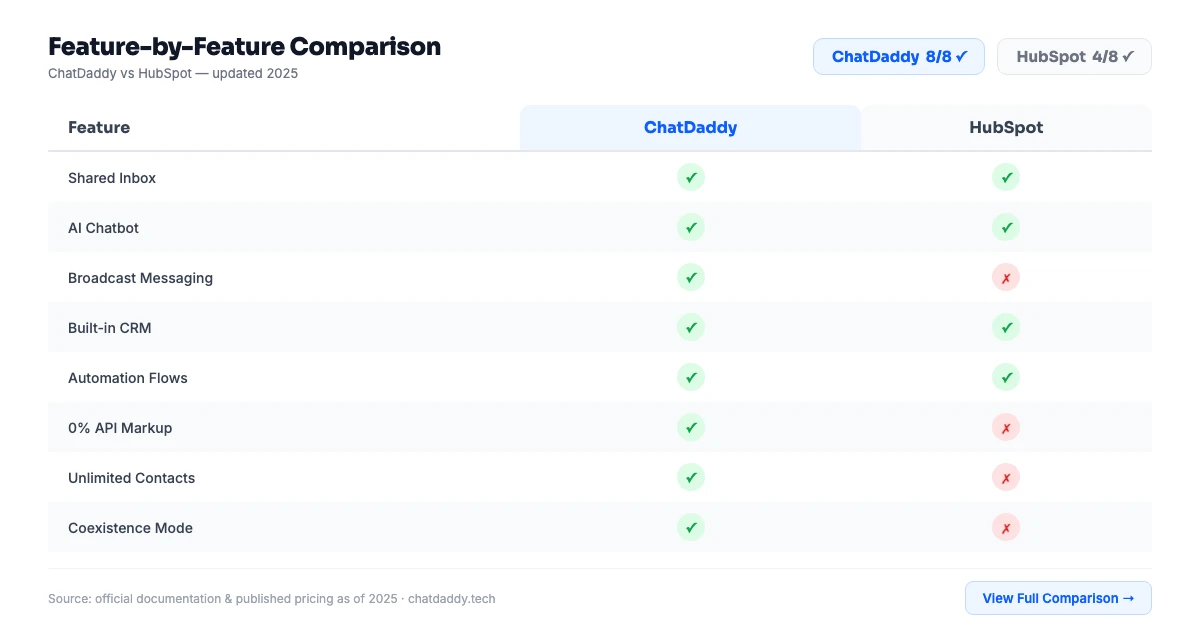
The most significant gap for most businesses is the all-in-one nature of ChatDaddy versus the specialist or infrastructure focus of HubSpot. ChatDaddy's automation builder supports complex multi-step workflows, while its built-in CRM eliminates the need for a separate sales pipeline tool.
ChatDaddy also supports coexistence mode — a unique capability that lets your team run both the WhatsApp Business API (for automation and chatbots) and the regular WhatsApp Business App on the same number at the same time. This is particularly valuable for businesses transitioning from manual WhatsApp management to API-driven automation.
3. Pricing Comparison
| Plan / Cost Item | ChatDaddy | HubSpot |
|---|---|---|
| Free Tier | $0/mo — free trial with full access | $0/mo — CRM only; WhatsApp requires paid tier |
| Entry Level | $119/mo (Basic) — 5 teammates, unlimited contacts | $800/mo (Marketing Hub Starter) — WhatsApp access requires higher tier |
| Mid Tier | $299/mo (Pro) — 10 teammates, AI chatbot, unlimited contacts | $3,600/mo (Marketing Hub Professional) |
| Top Tier | $799/mo (Max) — 15 teammates, all features | Custom enterprise pricing |
| Message Markup | 0% (Meta ISV Partner) | Markup may apply via BSP partner |
| Unlimited Contacts | Yes — all plans | Contact limits based on plan; additional cost for large lists |
| Coexistence | Free on all plans | Not available |
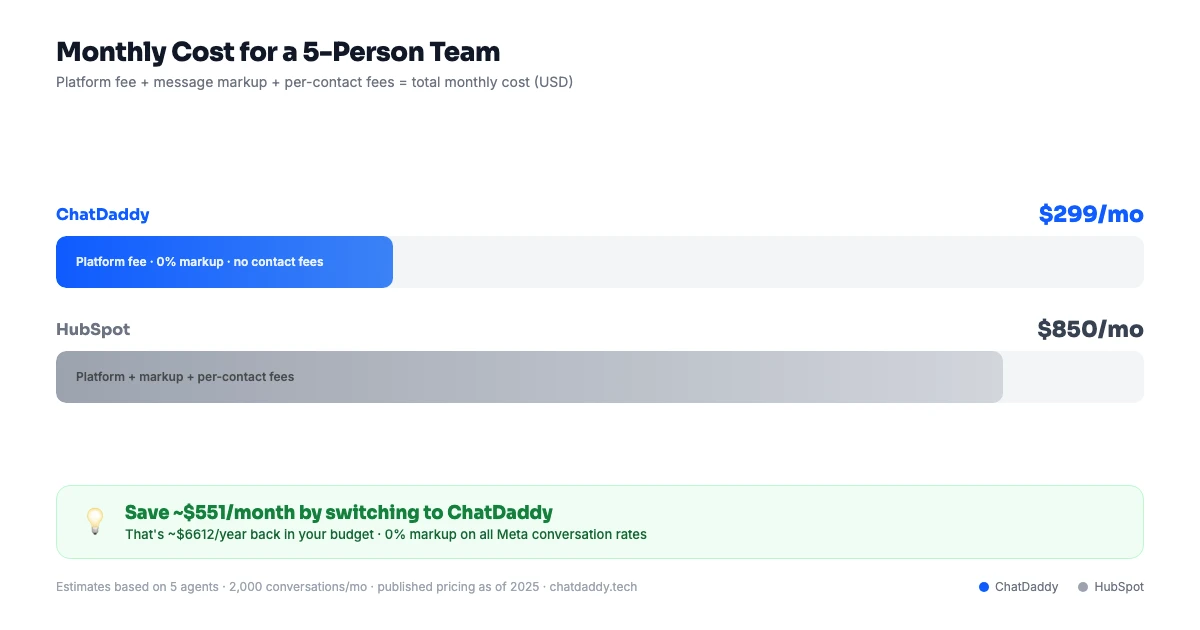
ChatDaddy's flat per-team pricing makes costs predictable as your team grows. Unlimited contacts on all plans means your list size never triggers a pricing increase — a critical differentiator against platforms that charge per-contact or per-message at scale.
As a Meta ISV Partner, ChatDaddy charges 0% markup on WhatsApp conversation fees. You pay Meta's published rates directly. Many BSPs and reseller platforms add a margin on top of these fees, increasing your per-conversation cost — sometimes by 20–50%.
4. ChatDaddy's Key Advantages
0% Message Markup (Meta ISV Partner)
ChatDaddy is a Meta ISV Partner — not a BSP reseller. This means ChatDaddy does not add markup to WhatsApp conversation fees. You pay Meta's rates directly, keeping your per-conversation cost at the lowest possible level. At 10,000+ monthly conversations, this can save hundreds of dollars per month compared to platforms that add BSP margin.
Unlimited Contacts on All Plans
Every ChatDaddy plan — from free trial to Max — includes unlimited contacts. There is no per-contact pricing, no list size limit, and no surprise cost when your database grows. Many competing platforms charge per 1,000 contacts, turning list growth into a significant cost driver.
Coexistence Mode
ChatDaddy's coexistence mode lets your business run both the WhatsApp Business API (for automation, chatbots, and team inbox) and the regular WhatsApp Business App on the same phone number simultaneously. This is unique to ChatDaddy and invaluable for businesses that want to automate without fully abandoning manual WhatsApp management.
Built-in CRM with Pipeline
ChatDaddy includes a complete CRM with deal stages, contact scoring, revenue tracking, and pipeline management — built directly into the platform. No external CRM subscription required. Most competing platforms require you to purchase a separate CRM tool and maintain a sync integration.
GPT-Powered AI Chatbot
ChatDaddy's AI chatbot (Pro and Max plans) uses GPT to qualify leads, answer questions, auto-tag contacts, and route conversations intelligently — going beyond simple keyword matching to genuine conversational AI.
5. Pros and Cons
ChatDaddy
Pros
- Meta ISV Partner with 0% message markup
- GPT-powered AI chatbot on Pro and Max plans
- Built-in CRM with pipeline and deal tracking
- Coexistence mode: API + WhatsApp Business App on same number
- Unlimited contacts on all plans
- Multi-channel: WhatsApp, Instagram, Facebook Messenger
- Free trial available; paid plans from $119/month
- 23,500+ businesses globally
Cons
- More features can mean a steeper initial learning curve for simple use cases
- AI Chatbot restricted to Pro and Max plans
- Less brand recognition than some enterprise platforms in specific markets
HubSpot
Pros
- Best-in-class CRM with deep sales pipeline capabilities
- Comprehensive marketing automation across email, ads, and social
- Large integration ecosystem with 1,000+ native integrations
- Excellent reporting and revenue attribution
- Strong free CRM tier for getting started
Cons
- WhatsApp features require expensive Marketing Hub tier ($800+/month)
- WhatsApp broadcast and automation less mature than dedicated platforms
- No coexistence mode for WhatsApp
- High cost of ownership at scale — pricing grows aggressively with contacts
- Not optimized for WhatsApp-first businesses
6. Who Should Choose Which?
Choose ChatDaddy if:
- WhatsApp is your primary revenue channel. ChatDaddy is purpose-built for WhatsApp-first businesses with deep broadcast, automation, and sales CRM capabilities.
- You need a complete platform — not just infrastructure. Inbox, chatbot, CRM, and automation are all included. No third-party tools required.
- Cost predictability matters. Flat monthly pricing with unlimited contacts and 0% message markup means no surprise bills as you scale.
- You want coexistence mode. Run API automation and manual WhatsApp simultaneously on the same number — only possible with ChatDaddy.
- You sell products online. ChatDaddy's WhatsApp Commerce and in-chat payments turn conversations into transactions.
Choose HubSpot if:
- You are an enterprise with a large technical team and need All-in-one CRM, marketing, sales, and service hub.
- Your use case is primarily crm and marketing platform rather than WhatsApp-first customer communication.
- You have existing infrastructure deeply tied to the HubSpot ecosystem and switching costs are significant.

7. How to Migrate from HubSpot WhatsApp to ChatDaddy
Migrating to ChatDaddy is a structured process that most businesses complete within 3–5 business days. ChatDaddy's onboarding team provides dedicated support throughout.
Step 1: Export HubSpot contacts
Export your contact list and deal pipeline from HubSpot. Note all WhatsApp message templates and automation workflows using WhatsApp as a step.
Step 2: Sign up for ChatDaddy
Create your account at app.chatdaddy.tech. ChatDaddy integrates natively with HubSpot, so you can keep using HubSpot CRM for other channels while moving WhatsApp to ChatDaddy.
Step 3: Configure HubSpot integration
Connect ChatDaddy to your HubSpot account via the native integration. Contacts, deal updates, and conversation logs will sync between both platforms automatically.
Step 4: Port your WhatsApp number
Transfer your WhatsApp number from the existing BSP to ChatDaddy. The process takes 1–3 business days.
Step 5: Rebuild WhatsApp workflows
Recreate your HubSpot WhatsApp automations in ChatDaddy's visual builder. Map HubSpot deal stage triggers to ChatDaddy workflow conditions.
Step 6: Set up broadcast campaigns
Migrate your WhatsApp template messages and build broadcast campaigns in ChatDaddy's broadcast engine.
Step 7: Go live
Deactivate WhatsApp from HubSpot's Conversations inbox and route all WhatsApp traffic through ChatDaddy.
Ready to Switch to ChatDaddy?
Join 23,500+ businesses with a free trial. Unlimited contacts, 0% markup, and coexistence mode included. Paid plans from $119/month.
Start Your Free Trial8. Frequently Asked Questions
Does HubSpot have WhatsApp integration?
Yes. HubSpot supports WhatsApp as a channel through its Conversations inbox and, on higher tiers, marketing messaging. However, WhatsApp-specific features like broadcasts and advanced automation require the Marketing Hub Professional plan at $3,600/month — far more expensive than WhatsApp-native platforms.
Can HubSpot send WhatsApp broadcasts?
WhatsApp marketing messages in HubSpot are available on higher-tier plans. The capability is less mature than purpose-built WhatsApp marketing platforms. ChatDaddy's broadcast engine offers unlimited segmented campaigns with scheduling, A/B testing, and analytics at a fraction of HubSpot's cost.
Is ChatDaddy cheaper than HubSpot for WhatsApp?
Yes — significantly. Accessing WhatsApp marketing features in HubSpot requires Marketing Hub Professional at $3,600/month. ChatDaddy's Pro plan at $299/month includes unlimited WhatsApp broadcasts, AI chatbot, built-in CRM, and automation — with 0% message markup.
Should I use HubSpot or ChatDaddy for WhatsApp?
Use HubSpot if WhatsApp is one of many channels in a large marketing operation and you already use HubSpot CRM deeply. Use ChatDaddy if WhatsApp is your primary customer communication channel and you need deep WhatsApp-specific features at an affordable, predictable price.
Does ChatDaddy integrate with HubSpot?
Yes. ChatDaddy integrates natively with HubSpot CRM, allowing you to sync contacts, deals, and conversation data between both platforms.
What is coexistence mode and does HubSpot have it?
Coexistence mode lets your team use both the WhatsApp API (for automation) and the WhatsApp Business App on the same number simultaneously. ChatDaddy offers this as a free feature. HubSpot does not support coexistence mode.